Sunday, 13 April 2014

Floppy disk

                             Floppy disk


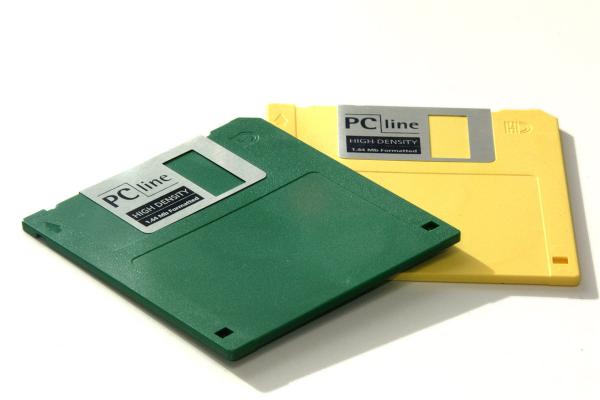
A floppy disk, or diskette, is a disk storage medium composed of a disk of thin and flexible magnetic storage medium, sealed in a rectangular plastic carrier lined with fabric that removes dust particles. Floppy disks are read and written by a floppy disk drive (FDD).
Floppy disks, initially as 8-inch (200 mm) media and later in 5¼-inch (133 mm) and 3½-inch (90 mm) sizes, were a ubiquitous form of data storage and exchange from the mid-1970s well into the 2000s.
By 2010, computer motherboards were rarely manufactured with floppy drive support; 3½-inch floppy disks can be used with an external USB floppy disk drive, but USB drives for 5¼-inch, 8-inch and non-standard diskettes are rare or non-existent, and those formats must usually be handled by old equipment.
While floppy disk drives still have some limited uses, especially with legacy industrial computer equipment, they have been superseded by data storage methods with much greater capacity, such as USB flash drives, portable external hard disk drives, optical discs, memory cards and computer networks.

 Operation

A spindle motor in the drive rotates the magnetic medium at a certain speed, while a stepper motor-operated mechanism moves the magnetic read/write head(s) along the surface of the disk. Both read and write operations require the media to be rotating and the head to contact the disk media, an action accomplished by a "disk load" solenoid. To write data, current is sent through a coil in the head as the media rotates. The head's magnetic field aligns the magnetic particles directly below the head on the media. When the current is reversed the particles align in the opposite direction encoding the data digitally. To read data, the magnetic particles in the media induce a tiny voltage in the head coil as they pass under it. This small signal is amplified and sent to the floppy disk controller, which converts the streams of pulses from the media into data, checks it for errors, and sends it to the host computer system.
A blank "unformatted" diskette has a coating of magnetic oxide with no magnetic order to the particles. During formatting, the particles are aligned forming a pattern of magnetized tracks, each broken up into sectors, enabling the controller to properly read and write data. The tracks are concentric rings around the center, with spaces between tracks where no data is written; gaps with padding bytes are provided between the sectors and at the end of the track to allow for slight speed variations in the disk drive, and to permit better interoperability with disk drives connected to other similar systems. Each sector of data has a header that identifies the sector location on the disk. A cyclic redundancy check (CRC) is written into the sector headers and at the end of the user data so that the disk controller can detect potential errors. Some errors are soft and can be resolved by automatically re-trying the read operation; other errors are permanent and the disk controller will signal a failure to the operating system if multiple attempts to read the data still fail.
After a disk is inserted, a catch or lever at the front of the drive is manually lowered to prevent the disk from accidentally emerging, engage the spindle clamping hub, and in two-sided drives, engage the second read/write head with the media. In some 5¼-inch drives, insertion of the disk compresses and locks an ejection spring which partially ejects the disk upon opening the catch or lever. This enables a smaller concave area for the thumb and fingers to grasp the disk during removal. Newer 5¼-inch drives and all 3½-inch drives automatically engage the spindle and heads when a disk is inserted, doing the opposite with the press of the eject button. On Apple Macintosh computers with built-in floppy drives, the ejection button is replaced by software controlling an eject motor which only does so when the operating system no longer needs to access the drive. The user could drag the image of the floppy drive to the trash can on the desktop to eject the disk. In the case of a power failure or drive malfunction, a loaded disk can be removed manually by inserting a straightened paper clip into a small hole at the drive's front panel, just as one would do with a CD-ROM drive in a similar situation.
See This Video:


Computer Laser Printer

                             Computer Laser Printer


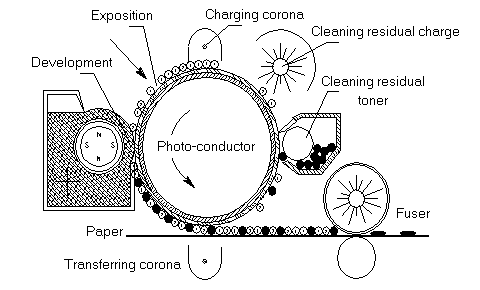
Laser printing is an electrostatic digital printing process that rapidly produces high quality text and graphics by passing a laser beam over a charged drum to define a differentially charged image. The drum then selectively collects charged toner and transfers the image to paper, which is then heated to permanently fix the image. As with digital photocopiers and multifunction printers (MFPs), laser printers employ a xerographic printing process, but differ from analog photocopiers in that the image is produced by the direct scanning of the medium across the printer's photoreceptor. Hence, it proves to be a much faster process compared to the latter.

Printing Process

1. The Cleaning phase cleans up the work from the previous page to prepare the Drum for printing a new page.

2. The second phase involves the Primary Corona wire. Primary meaning “first” is the first of two Coronas being used. The Primary Corona applies a uniform negative charge to the Drum.

3. Next, the Laser writes an electrical representation on the Drum of the image that will be printed.

4. During the Developing phase, Toner is applied electrically to the areas on the Drum that were written by the Laser.

5. Next, the Paper becomes part of the process. The Transfer Corona wire applies a positive charge to the Paper that pulls the negative charged Toner onto the Paper.

6. Finally, during the Fusing phase, the heat and pressure rollers melt the Toner particles into the Paper. The printed paper will be temporarily warm to the touch as the result of the Fusing phase.

These 6 phases are repeated for every page that is printed.

The magic remains, but the process is understood.


See The Below Video To Understand The Printing Process Briefly:


Computer-Aided Manufacturing

             Computer-Aided Manufacturing(1971)


 Computer-aided manufacturing (CAM) is the use of computer software to control machine tools and related machinery in the manufacturing of workpieces. This is not the only definition for CAM, but it is the most common; CAM may also refer to the use of a computer to assist in all operations of a manufacturing plant, including planning, management, transportation and storage. Its primary purpose is to create a faster production process and components and tooling with more precise dimensions and material consistency, which in some cases, uses only the required amount of raw material (thus minimizing waste), while simultaneously reducing energy consumption. CAM is now a system used in schools and lower educational purposes . CAM is a subsequent computer-aided process after computer-aided design (CAD) and sometimes computer-aided engineering (CAE), as the model generated in CAD and verified in CAE can be input into CAM software, which then controls the machine tool.


Radio-frequency identification

               Radio-frequency identification


Radio-frequency identification (RFID) is the wireless non-contact use of radio-frequency electromagnetic fields to transfer data, for the purposes of automatically identifying and tracking tags attached to objects. The tags contain electronically stored information. Some tags are powered by and read at short ranges (a few meters) via magnetic fields (electromagnetic induction). Others use a local power source such as a battery, or else have no battery but collect energy from the interrogating EM field, and then act as a passive transponder to emit microwaves or UHF radio waves (i.e., electromagnetic radiation at high frequencies). Battery powered tags may operate at hundreds of meters. Unlike a bar code, the tag does not necessarily need to be within line of sight of the reader, and may be embedded in the tracked object.
Radio frequency identification (RFID) is part of the family of Automatic Identification and Data Capture (AIDC) technologies that includes 1D and 2D bar codes. RFID uses an electronic chip, usually applied to a substrate to form a label, that is affixed to a product, case, pallet or other package. The information it contains may be read, recorded, or rewritten.
RFID tags are used in many industries. An RFID tag attached to an automobile during production can be used to track its progress through the assembly line. Pharmaceuticals can be tracked through warehouses. Livestock and pets may have tags injected, allowing positive identification of the animal.
Since RFID tags can be attached to cash, clothing, everyday possessions, or even implanted within people, the possibility of reading personally-linked information without consent has raised serious privacy concerns.

Pocket Calculator

                                     Pocket Calculator

By 1970, a calculator could be made using just a few chips of low power consumption, allowing portable models powered from rechargeable batteries. The first portable calculators appeared in Japan in 1970, and were soon marketed around the world. These included the Sanyo ICC-0081 "Mini Calculator", the Canon Pocketronic, and the Sharp QT-8B "micro Compet". The Canon Pocketronic was a development of the "Cal-Tech" project which had been started at Texas Instruments in 1965 as a research project to produce a portable calculator. The Pocketronic has no traditional display; numerical output is on thermal paper tape. As a result of the "Cal-Tech" project, Texas Instruments was granted master patents on portable calculators.
Sharp put in great efforts in size and power reduction and introduced in January 1971 the Sharp EL-8, also marketed as the Facit 1111, which was close to being a pocket calculator. It weighed about 455 grams or one pound, had a vacuum fluorescent display, rechargeable NiCad batteries, and initially sold for $395.
However, the efforts in integrated circuit development culminated in the introduction in early 1971 of the first "calculator on a chip", the MK6010 by Mostek, followed by Texas Instruments later in the year. Although these early hand-held calculators were very expensive, these advances in electronics, together with developments in display technology (such as the vacuum fluorescent display, LED, and LCD), led within a few years to the cheap pocket calculator available to all.
In 1971 Pico Electronics. and General Instrument also introduced their first collaboration in ICs, a complete single chip calculator IC for the Monroe Royal Digital III calculator. Pico was a spinout by five GI design engineers whose vision was to create single chip calculator ICs. Pico and GI went on to have significant success in the burgeoning handheld calculator market.
The first truly pocket-sized electronic calculator was the Busicom LE-120A "HANDY", which was marketed early in 1971. Made in Japan, this was also the first calculator to use an LED display, the first hand-held calculator to use a single integrated circuit (then proclaimed as a "calculator on a chip"), the Mostek MK6010, and the first electronic calculator to run off replaceable batteries. Using four AA-size cells the LE-120A measures 4.9x2.8x0.9 in (124x72x24 mm).
The first American-made pocket-sized calculator, the Bowmar 901B (popularly referred to as The Bowmar Brain), measuring 5.2 × 3.0 × 1.5 in (131 × 77 × 37 mm), came out in the Autumn of 1971, with four functions and an eight-digit red LED display, for $240, while in August 1972 the four-function Sinclair Executive became the first slimline pocket calculator measuring 5.4 × 2.2 × 0.35 in (138 × 56 × 9 mm) and weighing 2.5 oz (70g). It retailed for around £79. By the end of the decade, similar calculators were priced less than £5.
The first Soviet-made pocket-sized calculator, the "Elektronika B3-04" was developed by the end of 1973 and sold at the beginning of 1974.
One of the first low-cost calculators was the Sinclair Cambridge, launched in August 1973. It retailed for £29.95, or £5 less in kit form. The Sinclair calculators were successful because they were far cheaper than the competition; however, their design led to slow and inaccurate computations of transcendental functions.
Meanwhile Hewlett Packard (HP) had been developing a pocket calculator. Launched in early 1972 it was unlike the other basic four-function pocket calculators then available in that it was the first pocket calculator with scientific functions that could replace a slide rule. The $395 HP-35, along with nearly all later HP engineering calculators, used reverse Polish notation (RPN), also called postfix notation. A calculation like "8 plus 5" is, using RPN, performed by pressing "8", "Enter↑", "5", and "+"; instead of the algebraic infix notation: "8", "+", "5", "=".
The first Soviet scientific pocket-sized calculator the "B3-18" was completed by the end of 1975.
In 1973, Texas Instruments (TI) introduced the SR-10, (SR signifying slide rule) an algebraic entry pocket calculator using scientific notation for $150. Shortly after the SR-11 featured an additional key for entering "π". It was followed the next year by the SR-50 which added log and trig functions to compete with the HP-35, and in 1977 the mass-marketed TI-30 line which is still produced.
In 1978 a new company, Calculated Industries, came onto the scene, focusing on specific markets. Their first calculator, the Loan Arranger  (1978) was a pocket calculator marketed to the Real Estate industry with preprogrammed functions to simplify the process of calculating payments and future values. In 1985, CI launched a calculator for the construction industry called the Construction Master  which came preprogrammed with common construction calculations (such as angles, stairs, roofing math, pitch, rise, run, and feet-inch fraction conversions). This would be the first in a line of construction related calculators.

Holographic Memory

                                  Holographic Memory


Holographic data storage is a potential technology in the area of high-capacity data storage currently dominated by magnetic and conventional optical data storage. Magnetic and optical data storage devices rely on individual bits being stored as distinct magnetic or optical changes on the surface of the recording medium. Holographic data storage records information throughout the volume of the medium and is capable of recording multiple images in the same area utilizing light at different angles.
Additionally, whereas magnetic and optical data storage records information a bit at a time in a linear fashion, holographic storage is capable of recording and reading millions of bits in parallel, enabling data transfer rates greater than those attained by traditional optical storage.


Recording data

Holographic data storage contains information using an optical interference pattern within a thick, photosensitive optical material. Light from a single laser beam is divided into two separate optical patterns of dark and light pixels. By adjusting the reference beam angle, wavelength, or media position, a multitude of holograms (theoretically, several thousand) can be stored on a single volume.

Reading data

The stored data is read through the reproduction of the same reference beam used to create the hologram. The reference beam's light is focused on the photosensitive material, illuminating the appropriate interference pattern, the light diffracts on the interference pattern, and projects the pattern onto a detector. The detector is capable of reading the data in parallel, over one million bits at once, resulting in the fast data transfer rate. Files on the holographic drive can be accessed in less than 0.2 seconds.

Longevity

Holographic data storage can provide companies a method to preserve and archive information. The write-once, read many (WORM) approach to data storage would ensure content security, preventing the information from being overwritten or modified. Manufacturers believe this technology can provide safe storage for content without degradation for more than 50 years, far exceeding current data storage options. Counterpoints to this claim are that the evolution of data reader technology has – in the last couple of decades – changed every ten years. If this trend continues, it therefore follows that being able to store data for 50–100 years on one format is irrelevant, because you would migrate the data to a new format after only ten years. However, claimed longevity of storage has, in the past, proven to be a key indicator of shorter-term reliability of storage media. Current optical formats – such as CD – have largely lived up to the original longevity claims (where reputable media makes are used) and have proved to be more reliable shorter-term data carriers than the floppy disk and DAT media they displaced.

Cellular Mobile Phone


A mobile phone (also known as a cellular phone, cell phone, and a hand phone) is a phone that can make and receive telephone calls over a radio link while moving around a wide geographic area. It does so by connecting to a cellular network provided by a mobile phone operator, allowing access to the public telephone network. By contrast, a cordless telephone is used only within the short range of a single, private base station.
In addition to telephony, modern mobile phones also support a wide variety of other services such as text messaging, MMS, email, Internet access, short-range wireless communications (infrared, Bluetooth), business applications, gaming and photography. Mobile phones that offer these and more general computing capabilities are referred to as smartphones.
The first hand-held cell phone was demonstrated by John F. Mitchell and Dr Martin Cooper of Motorola in 1973, using a handset weighing around 2.2 pounds (1 kg). In 1983, the DynaTAC 8000x was the first to be commercially available. From 1990 to 2011, worldwide mobile phone subscriptions grew from 12.4 million to over 6 billion, penetrating about 87% of the global population and reaching the bottom of the economic pyramid.


© 2013. All rights resevered. Share on

Call of Duty Black Ops 15th Prestige Google+